> ## Documentation Index
> Fetch the complete documentation index at: https://docs.npcbuilder.com/llms.txt
> Use this file to discover all available pages before exploring further.
# Unity Plugin
> Install the NPC Builder SDK and chat with NPCs in Unity
The NPC Builder Unity package lets you import a single .unitypackage, configure API credentials, then script AI-powered NPC conversations with one component.
## Prerequisites
* Unity **2020.3 LTS** or higher (2019.4 works but examples use the new Input System).
* NPC Builder account with an **active plan** and project.
* Client ID / Client Secret (or Bearer token) generated in **Developers → API Keys**.
* Basic familiarity with C# scripting in Unity.
## 1 · Installation
Get the NPC Builder `.unitypackage` from the Asset Store (or company download link).
In the Unity Editor choose\
**Assets → Import Package → Custom Package** and select the downloaded file.\
Click Import when Unity shows the file list.
## 2 · Configure credentials
A ready-made config.json lives at Assets/NPCBuilder/config.json. Edit the placeholders:
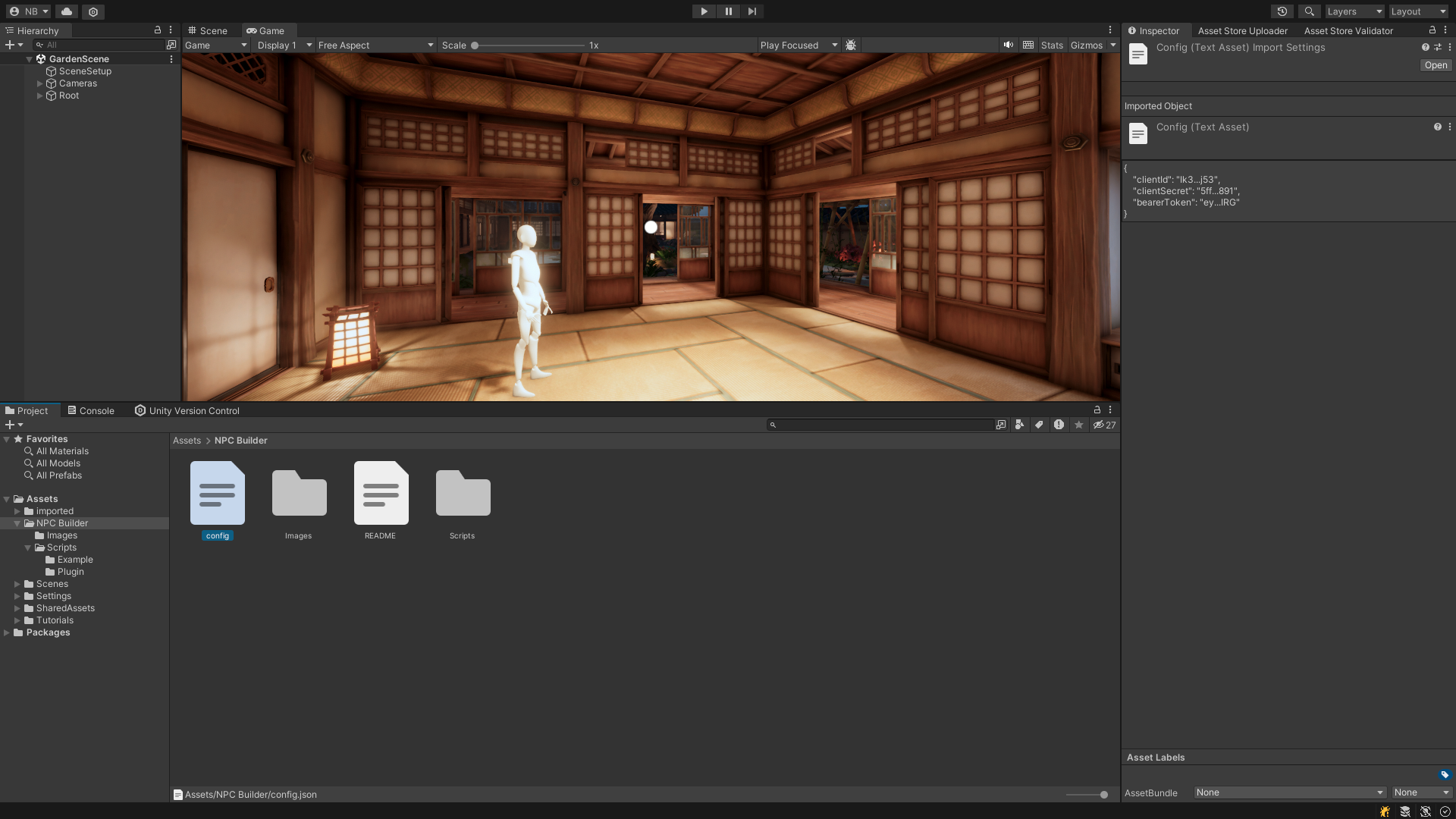 For credentials management refer to: authentication
```json theme={null}
{
"clientId": "YOUR_CLIENT_ID",
"clientSecret": "YOUR_CLIENT_SECRET",
"bearerToken": "YOUR_BEARER_TOKEN"
}
```
* Client ID + Secret is the preferred long-term auth.
* Bearer token is an alternative for quick tests.
* If both are present the plugin prioritizes the secret.
Keep credentials out of public repos. Use Unity’s **Secrets Manager** or CI variables for production builds.
## 3 · Attach the component
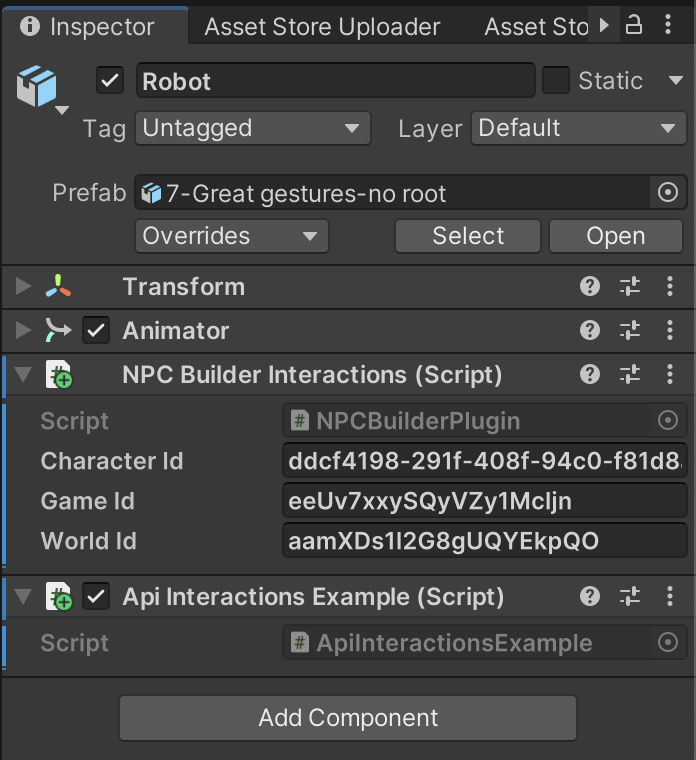
Drag your NPC prefab into the scene and add **NPCBuilderInteractions** via the Inspector.\
Fill
For credentials management refer to: authentication
```json theme={null}
{
"clientId": "YOUR_CLIENT_ID",
"clientSecret": "YOUR_CLIENT_SECRET",
"bearerToken": "YOUR_BEARER_TOKEN"
}
```
* Client ID + Secret is the preferred long-term auth.
* Bearer token is an alternative for quick tests.
* If both are present the plugin prioritizes the secret.
Keep credentials out of public repos. Use Unity’s **Secrets Manager** or CI variables for production builds.
## 3 · Attach the component
Drag your NPC prefab into the scene and add **NPCBuilderInteractions** via the Inspector.\
Fill Game ID, World ID, and character\_id—all visible in the dashboard context tree.
 ## 4 · Minimal chat script
```csharp theme={null}
using UnityEngine;
using NPCBuilder;
public class ChatStarter : MonoBehaviour
{
NPCBuilderInteractions npc;
void Awake()
{
npc = GetComponent();
npc.OnMessageReceived += OnReply;
npc.StartInteraction(ConversationRole.User, "Hello NPC!");
}
void OnReply(System.Collections.Generic.List convo)
{
Debug.Log(npc.GetConversationString());
}
void Update()
{
if (Input.GetKeyDown(KeyCode.V))
npc.StartInteraction(ConversationRole.User, "How are you?");
if (Input.GetKeyDown(KeyCode.C))
npc.ClearConversation();
}
}
```
The component queues calls asynchronously, so gameplay never blocks.
## 5 · Working with events & items
To understand with more details events & items explore Events and Items
NPC replies can include
## 4 · Minimal chat script
```csharp theme={null}
using UnityEngine;
using NPCBuilder;
public class ChatStarter : MonoBehaviour
{
NPCBuilderInteractions npc;
void Awake()
{
npc = GetComponent();
npc.OnMessageReceived += OnReply;
npc.StartInteraction(ConversationRole.User, "Hello NPC!");
}
void OnReply(System.Collections.Generic.List convo)
{
Debug.Log(npc.GetConversationString());
}
void Update()
{
if (Input.GetKeyDown(KeyCode.V))
npc.StartInteraction(ConversationRole.User, "How are you?");
if (Input.GetKeyDown(KeyCode.C))
npc.ClearConversation();
}
}
```
The component queues calls asynchronously, so gameplay never blocks.
## 5 · Working with events & items
To understand with more details events & items explore Events and Items
NPC replies can include character\_events or user\_events.\
Create **Action** or **Item** events in the dashboard (globally or per character), then reference them exactly in Unity:
```csharp theme={null}
// Map item events to GameObjects
npc.getGameObjectAssociatedToEvent += go =>
{
if (go != null)
Debug.Log($"Event item prefab set to {go.name}");
};
```
| Event Type | Purpose | Example. |
| ---------- | ------------------ | ---------------------------------------------------- |
| Action | No item; pure verb | wave, bow |
| Item | Includes an item | give\_sword, trade\_potion |
Need more endpoints? Explore OpenAPI or see Context API for UID details.